|
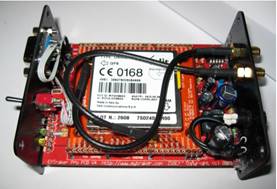
The EYTraker unit is a complete real time
APRS tracking solution by providing the user with an onboard GPS device, a 4G
LTE module with SIM card holder and an integrated micro-controlled management
system to control the OEM modules. There is no need for any additional
radio or GPS equipment, the EYTraker does all the tracking, in a small form
factor, directly onto aprs.fi
or any APRS compatible software systems, ANYWHERE in South Africa! The tracking unit will operate across
South Africa where there is GSM coverage. This fact being the big advantage
of this tracking unit, there is no need to be within the range of an APRS digital
repeater for this unit to function and relay position. The firmware for the current EYTraker
units is open source that can be made available upon request via email. This
is to protect the APRS network from unlicenced users. |
||||||||||||||||||||||||||||||||||||||||||||||||||
|
Current available tracking units: |
||||||||||||||||||||||||||||||||||||||||||||||||||
|
|
||||||||||||||||||||||||||||||||||||||||||||||||||
|
EYTraker V8
LTE |
EYTraker V9 LTE |
EYTraker V11 LTE |
||||||||||||||||||||||||||||||||||||||||||||||||
|
The EYTraker was ported to a larger
microcontroller and by utilising the 4G or LTE network for data transport the
tracking reliability has increased. SimCOM
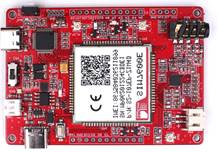
A7600 module |
The LTE unit is used in favour of a more
cost-effective CAT 1 LTE module. SimCOM
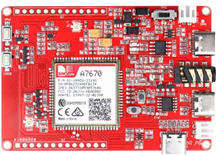
A7670E module |
The v9.xx
firmware was ported to a more powerful ESP32S3 controller using the more cost-effective
CAT 1 LTE module. SimCOM
A7670E module |
||||||||||||||||||||||||||||||||||||||||||||||||
|
|
|
|
||||||||||||||||||||||||||||||||||||||||||||||||
|
Firmware V8.21f - A7600 LTE Module |
Firmware V9.20 - A7670 LTE module |
Firmware V11.21 - A7670 LTE module |
||||||||||||||||||||||||||||||||||||||||||||||||
|
Microprocessor: SAMD21 |
Microprocessor: SAMD21 |
Microprocessor: ESP32-S3 |
||||||||||||||||||||||||||||||||||||||||||||||||
|
|
|
|
||||||||||||||||||||||||||||||||||||||||||||||||
Legacy tracking units still active but
deprecated: |
||||||||||||||||||||||||||||||||||||||||||||||||||
|
|
|
|
||||||||||||||||||||||||||||||||||||||||||||||||
|
EYTraker V4 2G |
EYTraker V5 Pro 2G |
EYTraker V6 2G |
||||||||||||||||||||||||||||||||||||||||||||||||
|
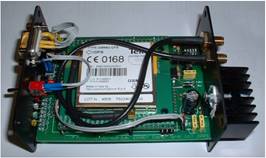
All three of the legacy units are based
on the Telit GM-862 GSM/GPS Module on a custom PCB
using a PIC18F252 microcontroller.
|
All three of the legacy units are based
on the Telit GM-862 GSM/GPS Module on a custom PCB
using a PIC18F252 microcontroller. This unit was updated with a switch mode
power supply and
also featured a messaging microcontroller.
|
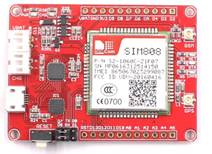
This version of the EYTraker uses the
GSM 2G network to connect to the APRS internet servers and can by unreliable
due to 2G network congestion and oversubscription. There are two versions of
this model based on the temperature measurement method being analogue with a
LM35 or digital based on DS1820 IC. SimCOM
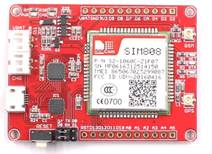
SIM808 module |
||||||||||||||||||||||||||||||||||||||||||||||||
|
|
|
|
||||||||||||||||||||||||||||||||||||||||||||||||
|
Firmware V4.14 – Telit
2G/GPS Module |
Firmware V5.12 – Telit
2G/GPS module |
Firmware: V6.37 - SIM808 2G Module |
||||||||||||||||||||||||||||||||||||||||||||||||
|
Microprocessor: PIC18F252 |
Microprocessor: PIC18F252 + 16F84 |
Microprocessor: ATMega
328 |
||||||||||||||||||||||||||||||||||||||||||||||||
|
|
|
|
||||||||||||||||||||||||||||||||||||||||||||||||
|
Availability |
||||||||||||||||||||||||||||||||||||||||||||||||||
|
|
|
|
||||||||||||||||||||||||||||||||||||||||||||||||
|
Due to the configuration of the
EYTrakers, the units can be constructed and configured without any complexity
by any amateur with basic project construction knowledge. I do make complete
units available from time to time so drop me an email to discuss. Please look at the EYTraker V9
page or EYTraker V11
page for more info on the components need to
construct and configure the tracking units. The Download
page has all the firmware .bin files and the
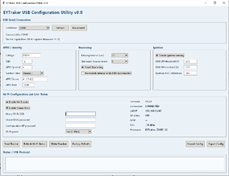
USB configuration application The ESP32S3 version of the LTE board can
be purchased from Micro Robotics but they can be out of stock from time to time. Getting stuck guidelines: If you get stuck with any of the
projects, read this first: ·
All the firmware and software referenced
for the projects can be found in the download
section. There is detailed revision
documentation included for all the published firmware to explain why there
are numerous version available. ·
Ensure
that you select the correct USB COM port in the USB configuration and
Flashing utility otherwise the programs will not work correctly. The programs
are not digitally signed so the executable files will be flagged by MS
SmartScreen but click on More info and run anyway. The programs are virus
free. ·
There are two types of .bin firmware
files in the download section. Use the FULL versions if flashing with the
Flashing utility and OTA.bin files when updating
from the web-based firmware. The ESP8266 use the same file for both update
instances so the firmware files are named OTA+FULL.bin. ·
Only use the “Erase entire flash before
programming (factory-clean install)” option in the Flash Utility if your
intent is to remove all the EEPROM and NVS data. ·
The correct USB COM port drivers must be
installed. The CP2102 USB to UART chip is used on the ESP32 boards. A Google
search will show you the path. ·
If you do not have an MQTT broker
available and want to test the firmware, you can use test.mosquitto.org
on port 1883 with no authentication (no username or password). ·
Consider downloading MQTT Explorer to view MQTT published data. This is very handy
application to troubleshoot and visually get a better understanding of MQTT
data. ·
On the EYTraker units, ensure that the
GPS and GSM antennas are correctly connected. Active GPS antennas work better
than the small ceramic antennas that ship with the PCBs. Ona new install the
GPS can take a few minutes to download the satellite ephemeris data and will
not connect immediately. By patient. ·
All the units output detail Serial data
on their USB COM ports that can be used for troubleshooting. Best option here
is to use the Arduino IDE serial monitor or consider a program like TeraTerm
since Windows does not ship with serial monitors like in the old days. ·
If you still getting stuck, send me an
email so we can try to resolve the issue. |
||||||||||||||||||||||||||||||||||||||||||||||||||
|
|
|
|
||||||||||||||||||||||||||||||||||||||||||||||||
|
More information |
||||||||||||||||||||||||||||||||||||||||||||||||||
|
|
||||||||||||||||||||||||||||||||||||||||||||||||||
|
The APRS-ZA
Java server now has a fixed IP address and is hosted by GamCo
in Rosebank. This change will provide power supply and network connectivity
redundancy for the APRS community in South Africa. Status
Page: http://www.aprs-za.com:14501 The APRS identifier for
the EYTraker has been updated to APCLEY from the original APGPRS. This
identifier conforms to the APRS identifier list. The list can be found
here: APRS UNProto List *****
Please Note: EYTraker and EYBridge are only
available to Licensed Radio Amateurs ***** Please drop me an email if
there is any additional information that is not covered on this website. APRSTM is
a registered trademark of Bob Bruninga (SK) WB4APR. Last Updated: 13 September
2026 Contact: hennie.zs6ey at gmail.com |
||||||||||||||||||||||||||||||||||||||||||||||||||